Creators usually discover the difference between storage and backup during a bad week. A phone is replaced, an SSD stops mounting, a cloud sync mirrors an accidental deletion, or a client asks for a master that exists only as a platform copy. The folder looked full; the production was not recoverable.
CISA’s data-protection guidance recommends backing up important files to an external drive or cloud service, while the National Archives’ digitization guidance explains the 3-2-1 rule: three copies, on two kinds of media, with one copy stored off-site. This article adapts those principles to short-form video production. It is not a guarantee against every failure, and a synced folder is not automatically an independent backup.
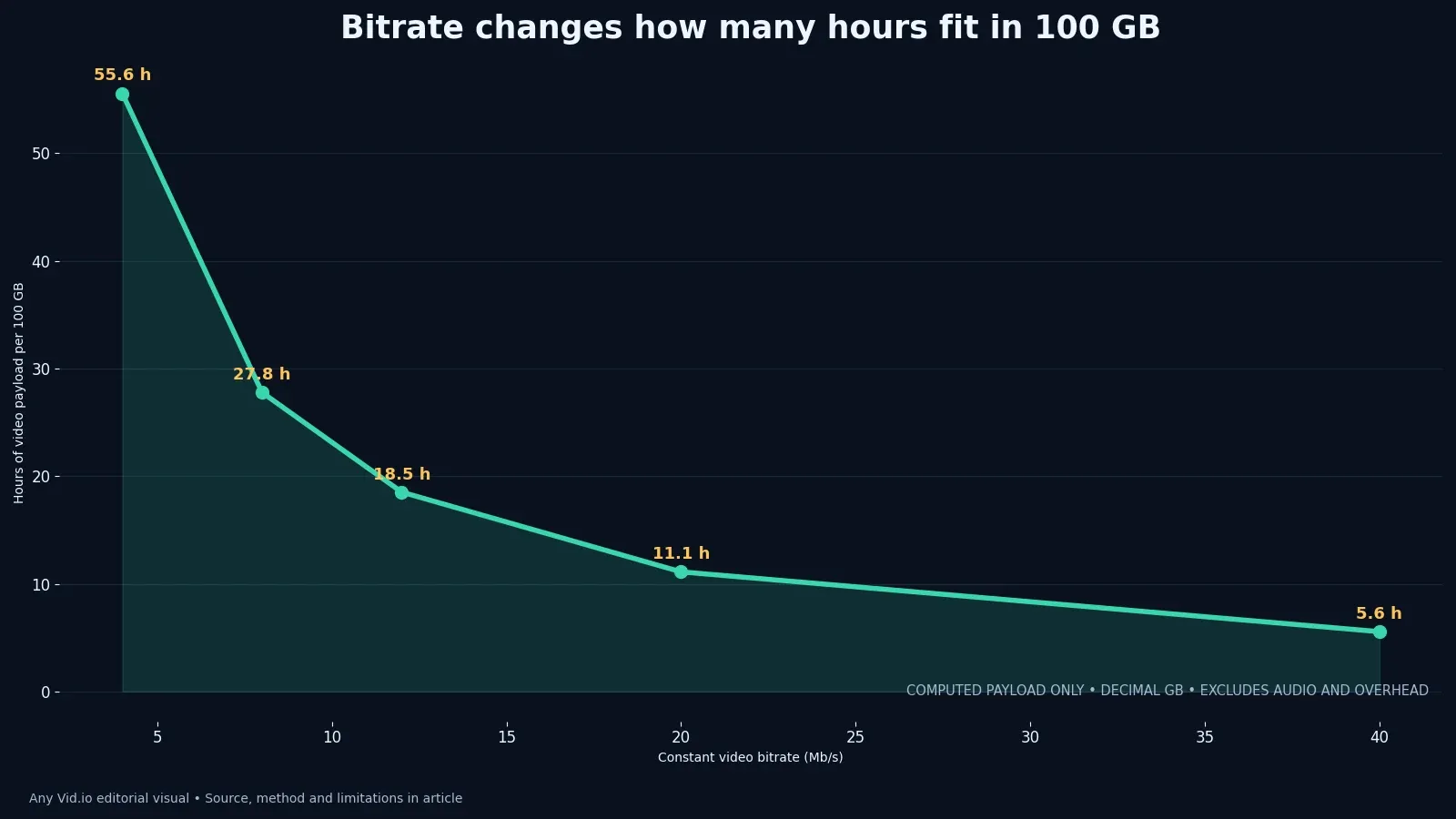
The case study uses exact storage arithmetic rather than invented failure statistics. One hundred decimal gigabytes can hold about 55.6 hours of video payload at 4 Mb/s, 27.8 hours at 8 Mb/s, 18.5 hours at 12 Mb/s, 11.1 hours at 20 Mb/s and 5.6 hours at 40 Mb/s, before audio and overhead. That calculation helps size the system; only a restore test proves the files can be used.
Inventory the assets that matter
List active and completed projects, then classify camera sources, audio, graphics, edit projects, approved masters, captions, rights records and platform copies by business value.
Connect every derivative to its parent recording using the long-to-short repurposing workflow so a short clip can lead back to the full source.
Mark irreplaceable files separately from reproducible proxies and caches. Backup priority should follow replacement difficulty, not simply folder size.
Before moving on, update a 3-2-1-style backup inventory with verification dates. For a solo creator who needs a restorable archive rather than a full drive, this section has done its job only when the decision can be checked against coverage, checksum verification, restore time and storage runway and the remaining uncertainty is written down.
Assign a role to every copy
Name one working copy, one local backup and one geographically or operationally independent backup; avoid vague “copy of copy” folders with no authoritative version. Avoid designing around a single metric.
Treat a platform post or permitted download as a delivery derivative unless the source master is truly gone, then document the recovery status honestly.
Use the Instagram Reel archive case study and TikTok companion guide for platform-specific recovery paths.
Pause here for a handoff check. Ask another person to follow the record without coaching; if keeping multiple untested copies while the only authoritative master is missing can still happen silently, the workflow needs a clearer owner, filename or acceptance test.
Calculate capacity before buying storage
Estimate one month of incoming camera footage, exported masters, graphics and project files before buying storage. For each video stream, decimal gigabytes are approximately bitrate in megabits per second multiplied by seconds, divided by 8,000. For example, 10 hours at 20 Mb/s need about 90 GB for video payload alone. Add audio, project files and space for several versions, then multiply the storage estimate by the number of independent copies in your backup design.
The chart calculates video payload only using constant bitrates and decimal gigabytes. A real archive also holds audio, container overhead, thumbnails, captions and sometimes many unused takes. Variable-bitrate footage changes the result further. Measure a representative week of actual files and compare that total with the calculation before committing to a drive size. Keep enough free space for the next production cycle and a restore test; a completely full backup volume is difficult to manage safely.
Budget separately for the working library, a local backup and an independent off-site or cloud copy. A 4 TB working library may require substantially more than 4 TB in total backup capacity, depending on retention and version history. Record each location's usable capacity, current free space, expected monthly growth and the date a replacement is needed. If a tier is too expensive, define which source files and deliverables receive priority rather than silently dropping a backup copy.
Put the result in a 3-2-1-style backup inventory with verification dates, attach the evidence path and date it so a later platform or software change can be compared with the same decision.
Use stable names and manifests
Adopt project_date_episode_role_version names and keep camera-original identifiers in a manifest so relinking remains possible after files move.
Record source device, duration, dimensions, frame rate, codec, rights status, checksum, authoritative role and backup locations in open fields.
Use the container and codec guide to record more than an extension: a MOV or MP4 filename does not identify the video stream or guarantee that your future editor can open it. Keep a small manifest in a readable format with one row per original and approved master. Include a stable project ID, the source filename, its location, codec details, checksum and the related output filenames. Test that the manifest still makes sense after moving a project to another drive.
Metrics such as coverage, checksum verification, restore time and storage runway are useful only when they lead to a visible choice and do not conceal the limits of this sample.
Verify integrity with checksums
Create cryptographic checksums for irreplaceable sources and approved masters, store the manifest with the archive and verify after transfer and on a schedule.
A matching checksum confirms that the file's bytes match the value recorded earlier. It cannot tell you whether the original recording was usable, legally available, or the correct edit. Open and inspect the master when you first archive it; then use its checksum to detect later changes. Keep the checksum manifest in the backup alongside a copy outside that backup, so a lost volume does not also erase the comparison record.
Investigate a mismatch before overwriting any copy. Preserve both versions until the authoritative source and failure mechanism are understood.
Schedule the integrity check before the next production cleanup, when old camera cards, proxies or local project folders are most likely to be removed. Mark failed checks in the inventory and preserve both copies until you understand the mismatch. Never overwrite the only remaining candidate simply because its date or filename looks newer.
Protect against sync and account failure
Follow CISA's backup guidance by placing at least one copy beyond the reach of the device, account or automation that controls the working library. A synced folder alone may mirror an accidental deletion or damaged edit. Check whether the service retains recoverable versions and for how long; record that answer in the inventory. Test recovery with a disposable sample file before relying on the setting for a client project.
Protect the accounts and drives that hold the backups with appropriate access controls, recovery methods and encryption. Document who can restore a project if the primary creator loses a phone or account. Store recovery keys separately from the encrypted files, and verify that the designated person can actually use them in a controlled restore exercise. An inaccessible encrypted archive fails the same practical test as a missing one.
Test what happens when a file is deleted or encrypted in the working folder. If the change instantly propagates everywhere, the copies may share one failure domain.
The failure drill should answer a concrete question: if the working drive disappears tonight, which copy can restore tomorrow's edit, and how long will retrieval take? Record the copy tested, the account used, the file version and any missing dependency. Repeat the check after changing sync settings or storage providers, since a successful restore under an earlier setup does not validate the current one.
Run a quarterly restore drill
Select a completed project, restore it to a clean location and measure how long it takes to locate, copy, verify and open the master, transcript and rights record.
Open media outside the original editor, seek through duration, confirm audio and orientation, and compare checksums with the manifest.
If restored footage has sync problems, inspect a duplicate and follow the audio drift diagnosis before converting anything in the protected archive. Compare the original recording, the approved master and the restored copy to identify where the problem entered. Keep the archived source untouched while testing a repair on a working copy.
Keep the restore log beside the inventory: which source was restored, which version was chosen, whether the checksum matched and which application opened it. This record prevents a recent but incomplete delivery file from replacing a verified production master merely because it has the newest timestamp.
Set retention and deletion rules
Retain irreplaceable sources and contractual deliverables according to rights, client obligations and realistic future value; caches and rejected generations can follow shorter rules. Give filenames the same care as the edit.
Pause deletion when ownership, litigation, licensing or client requirements are unclear. A storage policy must yield to applicable obligations.
Use the download-quality case study before discarding a larger source because a smaller platform copy looks acceptable on one phone.
The final review for a solo creator who needs a restorable archive rather than a full drive should answer three questions: can the asset be found, can the check be repeated, and can the rights or policy basis be explained in a 3-2-1-style backup inventory with verification dates?
Prove the backup by restoring a project
Choose one completed project with source video, audio, captions, graphics, edit data, licenses and a delivery export. Copy the project into the proposed backup structure, calculate checksums if your workflow supports them and disconnect the primary working drive. Restore the project from the backup to a separate location. Open the timeline, relink assets, play the sequence and produce a short verification export. The test result is binary at the task level: the project can be used or it cannot. Storage capacity alone does not prove recoverability.
Record the restore time and classify every delay. A slow transfer is a capacity or interface problem; a missing font is a dependency problem; a cloud-only file stub is an availability problem; an unlicensed stock element is a rights problem; an unreadable file is an integrity problem. These causes need different fixes, so do not collapse them into “backup failed.” Update the inventory fields or folder template that would have prevented each delay. Then repeat only the affected portion of the restore to verify the correction instead of assuming a reorganized folder solved it.
Calculate growth from actual weekly additions for at least a month, separating camera masters, generated candidates, proxies, caches and final deliveries. Use the measured median and a conservative busy-week allowance to estimate when each storage tier will fill. The chart in this article shows exact payload arithmetic at selected bitrates, not a promise about a creator’s real archive. Real projects also include audio, stills, databases, overhead and duplicate versions. Set a capacity alert early enough to buy, migrate and test new storage without deleting the only known-good copy under deadline pressure.
Case-study table
| Asset class | Suggested priority | Verification | Retention question |
|---|---|---|---|
| Irreplaceable camera and audio source | Highest | Checksum plus sampled playback | Can this ever be recreated with the same rights and performance? |
| Approved master | Highest | Checksum and full-duration open | Is this the signed-off deliverable? |
| Edit project and dependencies | High | Open project and relink sample | Are fonts, graphics, plugins and media included? |
| Captions and rights records | High | Readability and project match | Can future reuse be understood and authorized? |
| Platform or permitted downloaded copy | Contextual | Inspect provenance and playback | Is it evidence, recovery material or duplicate delivery? |
| Proxy, cache and rejected generation | Lower or temporary | Regeneration test | Is the cost of recreation lower than retention? |
Use this table as a starting inventory for your own project. Replace the example values with measured file sizes, named storage locations, a verified restore date and the person responsible for the next test. The chart above estimates video payload; the inventory below tracks whether a usable project can actually be recovered.
Put the method to work
Run one restore this week. Choose a finished project, recover it to a clean location, verify the checksum and open the master, captions and rights record. Time the process. A successful restore turns storage claims into evidence and gives the next hardware purchase a concrete recovery target.
Continue building a resilient production system with the archive and export guides on the AnyVid.io blog. Store only media and records you are entitled to retain, and protect account exports that contain personal information.

AnyVid.io Editorial Team
The AnyVid.io Editorial Team publishes practical guides on short-form video production, AI-assisted creator workflows, Instagram and TikTok strategy, video SEO, audience growth and creator monetization.
Frequently asked questions
What is a practical backup plan for a solo video creator?
Keep a working copy, a separate local backup and another copy isolated from the same device, credentials or physical failure. Adapt the design to sensitivity, budget and recovery needs, then test restoration. Copy count alone does not prove recoverability. Record the route, date and result in a 3-2-1-style backup inventory with verification dates so the same question can be checked against future platform or workflow changes.
Is cloud sync the same as backup?
Not necessarily. Sync can mirror deletions, corruption or ransomware across devices. A useful backup preserves recoverable versions or an independent copy and has a tested restore path. Review the actual service behavior instead of relying on the word “cloud.” For a solo creator who needs a restorable archive rather than a full drive, the safest next step is a reversible test with one authorized file and a written result rather than a universal assumption.
How much video fits in 100 GB?
It depends on bitrate and overhead. Video payload at a constant 8 Mb/s is about 27.8 hours per 100 decimal GB. At 20 Mb/s it is about 11.1 hours. Audio, container overhead, filesystem capacity and variable bitrate reduce or change the practical figure.
Should I back up downloaded copies of my social videos?
Keep them when they provide evidence of platform presentation or emergency recovery value, but label them as platform copies. Prioritize camera sources, edit projects and approved masters when those still exist. If keeping multiple untested copies while the only authoritative master is missing remains possible, preserve the original state and ask for rights or technical review before changing the only surviving copy.
What does a checksum prove?
A matching cryptographic checksum shows that the file’s bytes match the recorded version. It does not prove creative quality, rights, correct metadata or playability. Combine checksums with open-and-play restore tests and provenance records. Record the route, date and result in a 3-2-1-style backup inventory with verification dates so the same question can be checked against future platform or workflow changes.
How often should I test a video restore?
Choose a schedule based on risk and production volume; quarterly is a practical starting point for many solo creators. Also test after changing storage providers, hardware, encryption, folder structure or backup software. For a solo creator who needs a restorable archive rather than a full drive, the safest next step is a reversible test with one authorized file and a written result rather than a universal assumption.
Was this article helpful?
Tell us what worked so we can improve future content.