
A downloaded video can look worse for several different reasons: the available copy was already compressed, the downloader selected a smaller representation, the browser preview scaled it poorly, the editor transcoded it again, or the final upload created another delivery derivative. “Low quality” describes the symptom, not the point where the loss occurred.
This case study adds real measurements. An eight-second 720×1280 synthetic clip was generated with FFmpeg testsrc2, light temporal noise and 30 frames per second, then stored as an FFV1 reference. Four H.264 copies were encoded with libx264 preset veryfast at CRF 18, 23, 28 and 33. FFmpeg’s SSIM filter and PSNR filter compared each decoded output with the reference; ffprobe is the companion inspection tool for stream properties. Commands, sample and limitations are stated so the result can be reproduced.
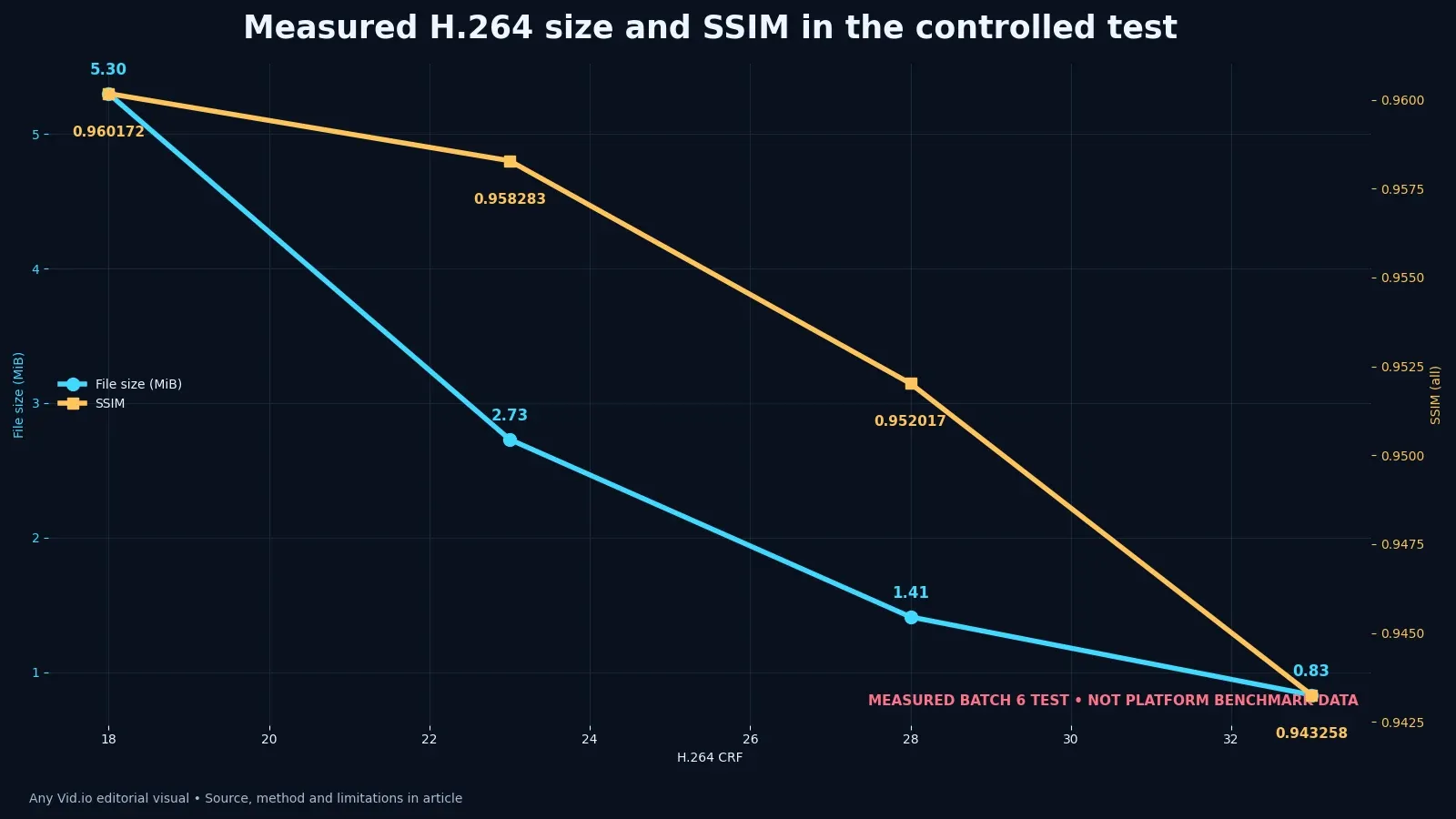
The test does not simulate Instagram, TikTok or every video downloader. Synthetic patterns, noise, encoder preset and short duration influence the numbers. SSIM and PSNR measure signal relationships, not storytelling, accessibility or audience preference. The chart is useful because it makes one trade-off visible: in this specific sample, file size fell sharply as CRF rose, while SSIM declined more gradually. The practical decision still requires watching the difficult frames.
Map every processing generation
List the camera source, edit export, platform delivery, retrieved copy, new edit export and second upload in order; every lossy generation is a candidate for visible change.
Use the container and codec explainer to identify the actual streams. Two MP4 files can have different codecs, resolutions, frame rates or color tags. Note each stage in a small comparison table, including the camera original, edit master, platform copy and retrieved file. If the upstream file is already soft, attributing all softness to the retrieval step would be an unsupported diagnosis.
Preserve one file from each stage before experimenting, then compare duration, dimensions, frame rate, codec, bitrate and audio rather than judging filenames.
Write down the question before measuring: did the chosen export setting reduce detail, did the platform change the delivered representation, or is the player scaling an otherwise adequate file? Identify the source and derivative pair that can answer it. When the true upstream master is missing, label the comparison as incomplete instead of manufacturing a conclusion from two downstream copies.
Reproduce the eight-second test
Generate a deterministic vertical reference or select a short source you own, document the resolution and frame rate, and keep the reference lossless or effectively lossless for the comparison. Stop testing further CRF values once the candidates bracket a useful trade-off for the intended viewing size; another encode needs a specific new question.
Encode one dominant variable at a time. This experiment held source, codec family, preset, pixel format and duration constant while changing CRF.
Record the FFmpeg build, complete encoder command, pixel format and reference frame geometry. Align reference and derivative by frame and dimensions before computing a full-reference metric. The CRF labels alone are not a reproducible method: an encoder preset or a different source can change the file size and appearance even when the same CRF value is used.
Pause here for a handoff check. Ask another person to follow the record without coaching; if blaming one tool without identifying which processing generation changed the signal can still happen silently, the workflow needs a clearer owner, filename or acceptance test.
Read file size as a consequence, not a quality score
For this eight-second synthetic sample, the measured files were 5.30, 2.73, 1.41 and 0.83 MiB at CRF 18, 23, 28 and 33 respectively. These are outcomes of the stated test, not recommended TikTok or Instagram upload sizes. A creator should repeat the method on a short, authorized sample of their own motion and texture before changing a production export preset.
A larger file can preserve more of a given encoding, but size alone cannot establish quality when duration, codec, resolution, content and settings differ.
Compare this bounded experiment with the broader 100-sequence encoding study before generalizing from one synthetic clip.
Put the result in a reproducible encode-and-inspection report, attach the evidence path and date it so a later platform or software change can be compared with the same decision.
Interpret SSIM and PSNR with care
FFmpeg’s SSIM documentation describes a similarity measurement; in this test overall SSIM moved from 0.960172 at CRF 18 to 0.943258 at CRF 33.
Average PSNR measured 29.06, 29.01, 28.88 and 28.70 dB across those four encodes. The spread is small in this pipeline and says little about whether an individual subtitle edge or face looks acceptable. Compare the metrics with matched playback at normal speed, and keep the exact files so a later reviewer can inspect any disagreement.
Neither SSIM nor PSNR knows whether the viewer needs to read a caption, recognize a product label or see a facial expression. Inspect those regions at the intended phone size, then check the same timestamp at full resolution to locate compression artifacts. Note whether the defect existed in the reference, arose during the export or appeared only after platform processing.
Metrics such as file size, SSIM, PSNR and visible artifact checks are useful only when they lead to a visible choice and do not conceal the limits of this sample.
Diagnose a downloaded copy before re-encoding
Use ffprobe or an equivalent inspector to record streams, codec, width, height, frame rates, duration and audio properties without changing the file.
Compare the retrieved copy with the best known upstream file. If the source master is unavailable, state that the diagnosis is relative rather than claiming the downloader changed the original.
When sync drifts rather than image detail falling, switch to the variable-frame-rate audio workflow because another high-bitrate encode will not repair timing.
Make this a pre-export check rather than an afterthought: preserve the original, record the output settings and inspect a short sample before encoding a long batch. If a later retrieval looks different, that dated pair of files gives you a baseline. Without it, 'the downloader reduced quality' is only a hypothesis.
Avoid the upscale and bitrate traps
Upscaling can change dimensions and apparent edge treatment, but it cannot recreate original texture with certainty; label enhanced derivatives and preserve the retrieved copy.
Exporting a compressed file at a much higher bitrate may prevent additional severe loss, yet it does not reverse the first compression generation.
Do not choose a retrieval method from an 'HD' label alone. Inspect the actual representation's pixel dimensions, codec, duration and audio, and distinguish a platform-delivered copy from the camera or approved edit master. A larger container file does not prove that more source detail survived.
State what the comparison cannot show. This test measures four encodes of a controlled synthetic source; it does not measure every platform's transcode pipeline or establish what an unavailable camera original looked like. If only the retrieved copy remains, focus on verifying that copy's properties and avoiding further unnecessary loss.
Test the result in the real delivery path
Watch fast motion, fine texture, gradients, low light, faces and text on the target phone and a larger display; metrics and magnified stills can overemphasize different defects.
If color rather than detail is wrong, use the HDR color-pipeline troubleshooting guide and inspect tags and playback mode separately.
Upload only an authorized test asset, wait until the destination finishes processing its available playback versions, and compare the final result with the exported upload file. Log the account setting, date, dimensions and playback mode because early previews may differ from a finished version. Do not infer a universal platform bitrate from one upload or one device's playback.
Keep the comparison files and measurements together. Label the reference, each encode and any platform copy so a future editor can reproduce the conclusion without relying on which filename looks newest. If a metric improved while the actual viewing result worsened, keep both observations and explain the trade-off.
Choose the least-lossy recovery path
Return to the approved master whenever it is available. A platform copy can be a useful recovery derivative, but do not overwrite the master with it. When provenance is uncertain, keep the original file untouched, duplicate it for inspection and document which observations are relative rather than claiming you measured an absent source.
Minimize avoidable generations of lossy encoding. If the surviving file must be edited, make one documented working copy from the best available source and export the final delivery once. Check that orientation, audio sync, captions and color survived the process before deleting any intermediate file. A higher output bitrate cannot recover detail that was lost before the edit began.
Place the recovered file into the creator backup plan created in this batch so emergency retrieval becomes the exception rather than the archive strategy.
At the end of a quality diagnosis, identify the exact pair of files compared, the processing stage where the change appeared and the evidence supporting it. Keep unresolved causes visible: missing original, playback scaling, color-management mismatch or an unobserved platform transcode. That is more useful than a universal promise of 'original quality'.
Reproduce the quality test with your own footage
Create an eight- to ten-second reference clip that resembles your difficult material: fine texture, camera movement, gradients, captions or low light. Keep that reference unchanged. Export four derivatives by changing one compression control while holding resolution, frame rate, duration, audio settings and encoder preset constant. Save the exact command or export preset and software version. This experiment will not reveal how a social platform encodes uploads, but it will show how your selected encoder and sample respond. That narrower result is enough to catch settings that waste storage or visibly damage the material.
Measure file size and, when the toolchain permits, a full-reference metric such as SSIM. Then watch the files at normal speed and intended display size before zooming into problem frames. Note banding, mosquito noise, texture loss, motion breakup and caption edges. A metric can rank signal similarity within a controlled setup; it cannot decide whether a viewer likes the edit or whether a download is the original master. Keep the subjective notes beside the numerical results so neither is presented as a complete definition of quality.
Repeat one surprising result before changing the production preset. Confirm that the reference and derivative align in time and geometry, since a shifted frame or scale mismatch can contaminate a comparison. If a downloader-produced copy is included, label its unknown transformations and compare it as a delivery artifact rather than assuming provenance. The practical decision should name the acceptable file for its purpose—archive master, edit proxy, review copy or upload export. There is rarely one universally best file, and the role label prevents a convenient small copy from quietly replacing the preservable source.
Case-study table
| CRF | Measured size (MiB) | Measured SSIM (all) | Measured PSNR average (dB) |
|---|---|---|---|
| 18 | 5.30 | 0.960172 | 29.06 |
| 23 | 2.73 | 0.958283 | 29.01 |
| 28 | 1.41 | 0.952017 | 28.88 |
| 33 | 0.83 | 0.943258 | 28.70 |
The table records this test's file sizes and full-reference measurements for a single synthetic source. Use it to understand the comparison method, then repeat the test with material you created or are authorized to use. Its values are not platform benchmarks.
Put the method to work
Reproduce the experiment on a short clip you own with difficult motion, texture and text. Keep the reference, commands and metrics, then watch the outputs without labels. The useful setting is not the largest file or highest score in isolation; it is the smallest defensible delivery that survives the actual content and next processing step.
Find more codec, export and troubleshooting case studies on the AnyVid.io blog. Use controlled tests on authorized media and preserve the upstream master before every conversion.

AnyVid.io Editorial Team
The AnyVid.io Editorial Team publishes practical guides on short-form video production, AI-assisted creator workflows, Instagram and TikTok strategy, video SEO, audience growth and creator monetization.
Frequently asked questions
Why does a downloaded video look blurry?
The available representation may be lower resolution or more compressed than the source, the player may be scaling a preview, or the file may have been transcoded again after download. Inspect the stream properties and compare with the best known upstream file before assigning a cause.
Does a larger video file always mean better quality?
No. File size also depends on duration, codec, audio, resolution, frame rate, content complexity and encoder settings. Compare like with like. In this controlled test only CRF changed, which makes size differences interpretable within the sample. For a creator diagnosing a downloaded or exported video that looks soft, the safest next step is a reversible test with one authorized file and a written result rather than a universal assumption.
What is SSIM?
Structural Similarity Index is an objective measure that compares structural information between a reference and a processed image or video. It is useful for bounded technical comparisons, but it does not measure story quality, factual accuracy, accessibility or viewer preference.
What do the CRF results in this article prove?
They prove the reported measurements for one eight-second 720×1280 synthetic source, one FFmpeg build, libx264 preset veryfast and four CRF settings. They do not establish platform bitrates, downloader behavior or a universal best CRF. If blaming one tool without identifying which processing generation changed the signal remains possible, preserve the original state and ask for rights or technical review before changing the only surviving copy.
Can increasing bitrate restore quality after download?
No. A higher-bitrate export can reduce additional loss during the next encode, but it cannot reconstruct source details that are absent from the downloaded representation. Keep the retrieved file and avoid unnecessary generations. Record the route, date and result in a reproducible encode-and-inspection report so the same question can be checked against future platform or workflow changes.
Should I use a third-party downloader to recover my own video?
Prefer the original master and platform-native or account-export routes. If a third-party utility is relevant, use it only for media you created, own or have permission or another lawful right to save, and evaluate privacy, security, quality and terms before providing a URL.
Was this article helpful?
Tell us what worked so we can improve future content.