
AI video is most useful when it becomes one controlled stage in a production, not a slot machine that consumes prompts and budget. This center shows creators how to define a scene, prepare references, generate testable shots, preserve character and environment continuity, edit around defects, document provenance and disclose synthetic media responsibly. It applies to stylized sequences, product concepts, educational visuals and mixed live-action projects; it does not promise that one model or prompt will solve every shot.

Choose AI deliberately
Begin with the communication problem. AI generation may help visualize a place that cannot be filmed, create a stylized transition, explore art direction or produce a safe conceptual demonstration. It may be the wrong choice when factual evidence, precise product behavior, a real testimony or an exact interface must be shown. Synthetic footage should not impersonate proof.
List alternatives: shoot live action, animate simple graphics, license appropriate media, use photographs with motion, build a physical miniature or describe the idea directly. Compare control, cost, turnaround, rights, repeatability and audience expectations. AI can generate a striking frame quickly while taking many attempts to maintain the same character through a conversation.
Define the acceptable role. A project may use AI for brainstorming only, for background plates, for complete stylized scenes or for post-production cleanup. This boundary guides disclosure and review. Write it into the brief so the method does not expand quietly under deadline pressure.
Never use synthetic scenes to fabricate a real event, testimonial, product result or person’s statement. When documentary authenticity matters, preserve the original evidence and make edits transparent. The goal is creative production with honest context, not visual plausibility at any cost.
Write a production brief
A useful brief names the audience, message, format, duration, visual world, emotional tone, required shots, prohibited content, continuity anchors, sound approach, publication destinations and disclosure plan. It also names the deadline and generation budget. Without a cap, creators can spend more time chasing an almost-perfect shot than the shot contributes to the video.
Define success at the sequence level. “Beautiful” is not testable. “A six-second establishing shot that clearly shows one traveler entering a wind-powered desert station, with space for a title and no visible text” is. Add technical needs such as vertical composition, camera motion, cut point and whether the first and last frames must match adjacent shots.
Create a rejection list: extra fingers, duplicated objects, shifting costume, unreadable signage, impossible reflections, unstable product shape, flickering faces, camera motion that changes direction and imagery too close to a real brand or person. A rejection list speeds review and keeps novelty from hiding defects.
Separate facts from fiction. If the video teaches a real process, identify which shots are conceptual illustrations. Narration should not imply that an invented diagram or simulated result is measured evidence. Include source links for technical or policy claims.
| Brief element | Question | Useful output | Risk if omitted |
|---|---|---|---|
| Audience | Who must understand this? | Vocabulary and pace | Generic imagery |
| Shot function | What does the shot establish? | Visible action and cut point | Pretty but unusable footage |
| Continuity | What cannot change? | Reference sheet | Character drift |
| Restrictions | What must not appear? | Negative constraints | Logos, artifacts, unsafe content |
| Disclosure | What should viewers know? | Label and description plan | Misleading context |
Design continuity before prompting
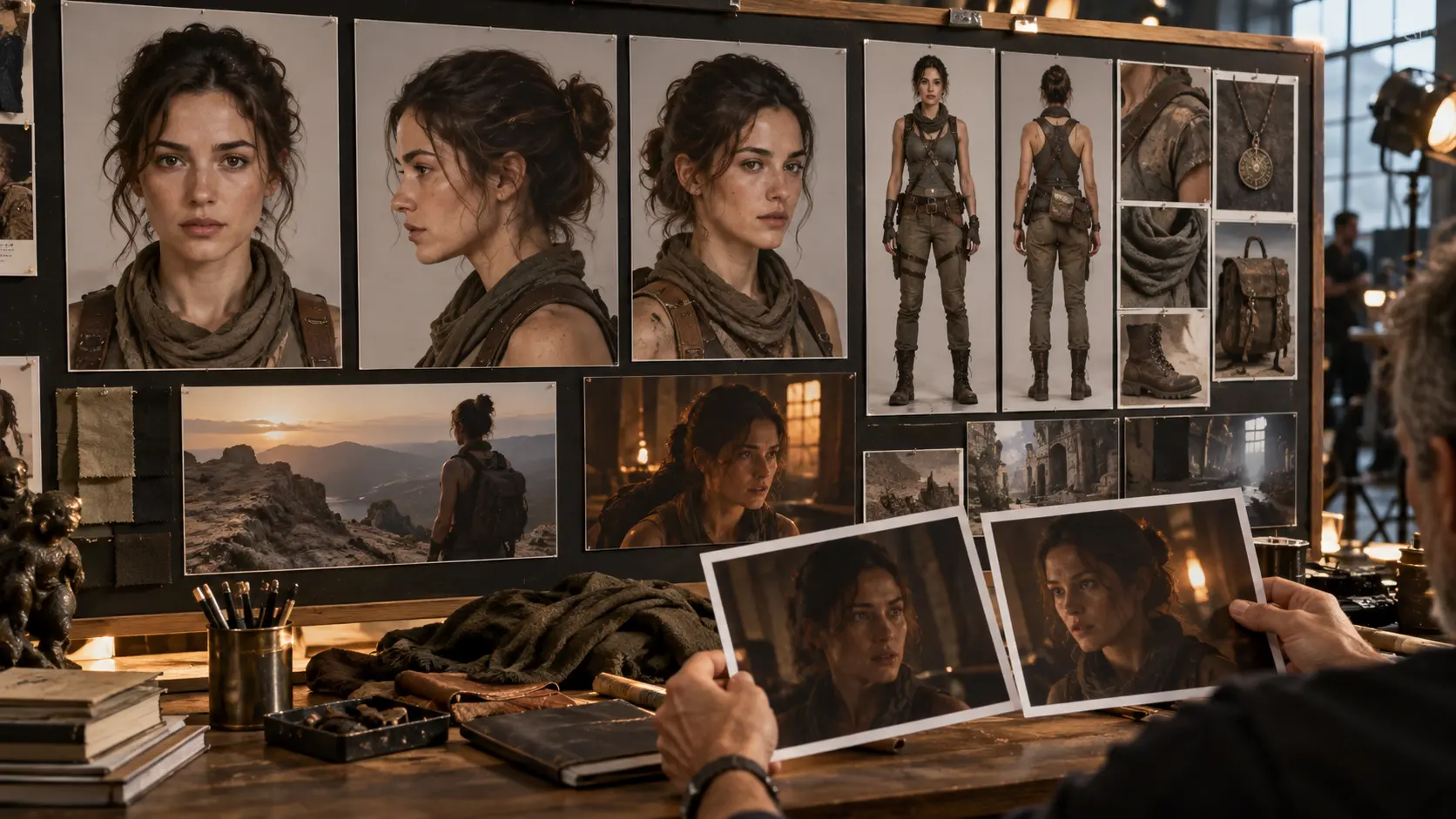
Continuity is a production asset. Build a character sheet with front, profile and three-quarter views; age range; proportions; hair; clothing layers; accessories; posture and expression range. Avoid defining identity only through vague adjectives. Record which elements may change and which are locked.
Create an environment sheet with layout, materials, time of day, light direction, palette and recurring objects. A room described as “cozy” can change completely between shots. A plan that specifies one north-facing window, pale plaster, green chair and warm table lamp creates stronger anchors.
Keep a continuity ledger after each accepted generation. Note the seed or relevant generation setting when available, prompt, reference files, model version, selected frame and visible deviations. The character consistency workflow provides a detailed approach to model sheets, shot order and reference strength.
Design sequences around what the system can repeat. A wide shot, hand insert and reaction may be easier to control than a single complex shot with dialogue, object handling and a camera orbit. Good direction reduces simultaneous variables.
Build prompts from shots
Prompt for one shot, not the entire screenplay. Describe subject, action, environment, composition, camera, light, motion, duration and constraints in the order that best communicates priority. Keep language concrete. “She is anxious” may produce a stereotype; “she grips the folded map, pauses at the doorway and looks toward the empty road” gives visible behavior.
Specify the frame’s job. Establishing shots need readable geography. Inserts need stable objects and hands. Transitions need a predictable beginning or ending. If text is required, add it later with a real typography tool rather than asking a generative model to invent signage.
Change one variable between tests. If subject, lens, motion, lighting and style all change, you will not know which instruction improved the result. Save prompt variants and selected outputs. A small prompt log prevents circular experimentation.
Use negative constraints sparingly and specifically: no logos, no readable text, one person, two hands visible, stable costume. A long list of every possible defect can dilute the positive direction. Review actual failures and add constraints that address them.
Test cheaply and measure usable output
Estimate cost per usable shot, not cost per generation. Include generation fees, failed attempts, review time, upscaling, cleanup, editing and replacement work. A cheaper model that requires twenty attempts may cost more than a controlled method that succeeds in four. The cost-per-usable-shot framework shows how to compare workflows without pretending list price equals production cost.
Start with the hardest continuity shot at draft quality. If the core action cannot be produced reliably, redesign early. Do not spend the budget completing easy establishing images before testing the hand interaction or recurring face on which the story depends.
Create a test matrix with one question per row: Can the character remain recognizable across three angles? Can the product shape stay stable? Can the camera hold a slow push rather than orbit? Record attempts and acceptance reasons. Label the sample as your project data, not a universal benchmark.
Set stop rules. After a defined number of failed attempts, simplify motion, split the shot, change medium or film a practical insert. Stop rules protect both budget and judgment. Repeated exposure to almost-correct outputs can make defects feel acceptable.
Review every generation
Watch at normal speed, frame by frame and in a loop. Check anatomy, identity, object permanence, physics, reflections, shadows, background movement and camera continuity. Listen if audio was generated. A result can feel persuasive on first viewing while a hand changes shape during the cut point.
Review factual implications. A conceptual medical, financial or technical scene may accidentally show unsafe or impossible practice. Replace it with an abstract illustration when accuracy cannot be guaranteed. Do not let cinematic authority turn invented detail into instruction.
Check for unwanted marks, brand-like shapes, fake interface elements and unreadable text. Crop or remove only when doing so does not conceal a larger problem. Regenerate severe defects. Maintain a quality threshold across the sequence; one uncanny shot can undermine otherwise careful work.
Ask a second reviewer to explain what they believe happened. If their interpretation differs from the intended action, the shot failed communication even if it is visually attractive. Record the reason for rejection so later prompts address a real pattern.
Edit AI footage into a story
Edit from accepted shots, not from everything generated. Put rejected outputs in a separate archive so they do not return accidentally. Build a silent visual cut first and test whether action direction, geography and character identity remain understandable.
Use cutaways deliberately to bridge continuity gaps: an environmental detail, reaction, object insert or graphic can hide a difficult transition while adding information. Do not cover every flaw with rapid cuts. If the viewer cannot inspect the result, the scene may feel evasive.
Match color, grain and motion across sources. Live action and generated material can coexist when their differences are intentional. Trying to force perfect photorealism may be less convincing than choosing a coherent stylized treatment. Preserve an ungraded source copy.
Export clean masters and platform versions using the vertical-video production standards. Avoid repeated compression. If generated detail shimmers, aggressive sharpening can make it worse; consider gentle stabilization, selective cleanup or a shorter shot.
Create sound and captions responsibly
Sound gives synthetic images physical weight. Build a cue sheet for atmosphere, footsteps, cloth, mechanisms and transitions. Use recordings you made or assets licensed for the intended use. Do not clone a person’s voice without appropriate consent.
Generated narration should be reviewed for pronunciation, pacing, emotional fit and disclosure. A plausible voice can still mislead when it resembles a real person or is presented as an authentic testimony. Record authorization and tool settings with the project.
Mix dialogue clearly and preserve dynamic contrast without sudden uncomfortable peaks. Caption all meaningful speech and relevant sound. Correct automatic transcription manually. If a fictional character speaks, captions should reproduce the actual line, not the intended script when generation changed it.
Do not use music to manufacture evidence or emotional certainty around sensitive claims. Sound design can shape interpretation, so use it honestly, particularly in news-like, documentary or case-study formats.
Document rights and provenance
Maintain a source register for prompts, reference images, footage, voices, music, fonts and stock assets. Record who supplied them, what permission applies, tool terms reviewed and where the evidence lives. The rights and permissions center provides a broader asset inventory.
Do not upload confidential client material, private faces or unreleased products to a service without understanding its data terms and authorization. Remove metadata or identifying details only when appropriate and lawful; do not use privacy as a reason to erase provenance internally.
Keep generated originals, selected outputs, edits and final publication files. Hashes or stable filenames can help map the chain. A provenance record supports corrections and explains how a scene was made if viewers, clients or platforms ask.
If using AnyVid.io to save a published reference, use it only for media you created, own, or have permission or another lawful right to save. Saving a visible video does not license its style, characters, voice or footage.

Disclose synthetic media
Disclosure should answer what a reasonable viewer needs to know. Was a realistic person or event altered? Is a demonstration conceptual rather than recorded? Is a voice synthetic? Place the information where it will be noticed, using platform tools and plain-language context when appropriate.
YouTube’s altered or synthetic content guidance describes its current creator disclosure setting and examples. TikTok, Instagram and other destinations maintain their own policies and labels. Review the current rules at publication time rather than relying on a saved screenshot.
Disclosure does not cure deception. A label cannot make unauthorized impersonation, fabricated evidence or false endorsement acceptable. It is one part of responsible production alongside permission, accurate framing and editorial judgment.
Keep a screenshot or record of the publication disclosure and caption. If the content is repurposed, carry the disclosure forward. A label attached inside one platform may disappear when a clean master moves elsewhere.
Three example workflows
Illustrative workflow: a fantasy micro-film
Define a six-shot story and lock one character sheet. Test the most difficult interaction first. Generate draft frames, approve continuity, create motion, review frame by frame, add original sound and disclose the synthetic production in the description. The Air Head case study examines a documented AI-film production without treating its outcome as a universal benchmark.
Illustrative workflow: a product concept
Use AI for mood and environment, not for claims about the real product. Film the actual object and operation. Composite or intercut transparently, ensure shape and color remain accurate, and get client approval. Reject generated hands or mechanisms that imply functions the product lacks.
Illustrative workflow: an educational sequence
Write the factual explanation and sources first. Use abstract generated visuals for concepts that cannot be filmed, then add precise labels in editing. Ask a subject-matter reviewer to check the final relationship between narration and image. State when diagrams are conceptual.
Each workflow uses the same spine: purpose, brief, references, controlled tests, quality review, editorial assembly, rights record and disclosure. The creative surface can change completely while the production discipline remains stable.
Frequently asked questions
Which AI video tool is best?
There is no universal best tool. Compare control, consistency, privacy, rights terms, output quality, accessibility and total cost for your shots. Test with one difficult representative scene before committing.
How many generations should a shot require?
Set a budget based on the shot’s value. Track attempts and stop when failures repeat. Redesigning the shot is often more productive than prompting indefinitely.
Can AI video be monetized?
Potentially, depending on originality, platform policies, rights, audience value and advertiser requirements. Generation alone does not create a viable business or guarantee eligibility. Add human editorial value and follow current rules.
How can character consistency improve?
Use a detailed reference sheet, stable anchors, simpler actions, controlled shot order and a continuity ledger. Review identity across the sequence, not one frame at a time.
When should AI use be disclosed?
Follow current platform and legal requirements, and disclose when synthetic or altered media could materially affect how a reasonable viewer understands a realistic person, event, claim or demonstration.
Should prompts be archived?
Yes, when allowed and safe. Prompts, sources, model versions and selected outputs help reproduce work, answer provenance questions and diagnose why a sequence changed.
Use an AI shot scorecard
Novelty makes generated footage easy to overrate. A scorecard shifts attention from “Does this look impressive?” to “Can this shot perform its job?” Review five dimensions: story clarity, continuity, technical stability, factual integrity and rights or disclosure risk. Use pass, revise or reject rather than a false precision score.
Story clarity asks whether a viewer can identify the subject, action and consequence. Continuity compares character, wardrobe, environment, screen direction and object state with adjacent shots. Technical stability covers anatomy, geometry, flicker, texture crawl and camera motion. Factual integrity checks whether the image implies a real mechanism, event or result. Rights and disclosure checks sources, likeness, marks and the planned viewer context.
Reviewers should write the rejection reason. “Bad” teaches nothing; “the bottle gains a second cap during the close-up” tells the director whether to simplify action, change framing or regenerate. Maintain examples of accepted and rejected frames so collaborators calibrate quality.
Give story and integrity veto power. A technically clean shot that communicates the wrong action should not pass because it is beautiful. A visually minor defect may be acceptable in a stylized background if it does not distract or mislead. The threshold depends on prominence and purpose.
After the sequence is assembled, score again. Shots that passed alone may clash in pace or identity. Watch without sound, listen without picture and show the cut to someone who has not read the prompt. Their explanation is a useful comprehension test.
Recover from common generation failures
The character changes between angles
Reduce simultaneous changes, strengthen the reference sheet and generate anchor views before action shots. Keep costume, hair, age and lighting language stable. If one angle remains unreliable, replace it with an insert or silhouette that still advances the story.
Hands or objects deform during interaction
Split the action into setup, contact and result. Film a practical close-up when accuracy matters. Faster cutting is not a responsible fix when the shot demonstrates a product or safety step.
The camera moves unpredictably
Request one simple movement with a clear subject relationship, or generate a locked shot and add restrained motion in editing. Complex orbits often expose geometry and continuity problems.
The output contains fake text or marks
Regenerate with no readable text or signage, crop only when the mark is peripheral and harmless, and add accurate typography later. Reject anything that resembles a real endorsement or identity.
The sequence feels synthetic despite clean frames
Improve causality, sound, performance rhythm and shot duration. Add practical texture or live-action elements where appropriate. Perfect surfaces and constant motion can feel less credible than controlled imperfection.
The budget disappears into iterations
Return to the shot function and stop rule. Simplify, change medium or remove the shot. A production is judged by the finished communication, not by how many generations were attempted.
Close the project with a production archive
At delivery, create an archive that another qualified editor could understand without reading private chat history. Include the approved brief, shot list, character and environment references, source register, prompt log, accepted generations, rejection notes, edit project, audio licenses, captions, disclosure copy and clean masters. Keep client-confidential inputs under appropriate access controls.
Name generations by scene, shot and version rather than the provider’s random identifier. Preserve the original filename in metadata or a mapping when it is needed for traceability. Mark every selected shot and move rejected work out of the active media pool. This prevents a beautiful but unsafe generation from returning during a rushed revision.
Record the model or service version and generation date because behavior and terms can change. Save the relevant terms or license evidence when allowed. Do not include secret credentials in the archive. A future editor needs provenance, not access to your account.
Finish with a short limitations note: which shots are synthetic, which details are conceptual, where continuity compromises remain and what disclosure accompanied each publication. If the video is translated, shortened or licensed later, this note helps the next team preserve honest context.
The final editorial question
Before publication, ask whether the audience would interpret the scene differently if they knew exactly how it was made. If the answer is yes, improve the context or disclosure. Then ask whether the sequence would still be useful without its novelty. Strong AI-assisted work has a clear idea, evidence, craft or emotional purpose; it does not depend entirely on viewers wondering which model produced it.
Archive the answer with the project. This small reflection helps teams make consistent decisions across campaigns and gives future revisions a principled starting point. Technology will change, but the obligations to avoid deception, respect rights and communicate clearly remain.