A TikTok video downloader can solve one narrow problem: obtaining an accessible copy of a video representation. It does not rebuild the shooting files, edit timeline, clean voice track, caption file or permission history that produced the post. For a creator trying to protect years of work, the real task is an archive design problem disguised as a download problem.
TikTok documents an official Download your data process and separate video download controls. Those routes serve different purposes, and controls can vary with privacy settings, age, region, account, device and app version. This guide begins with official and creator-controlled sources. It applies only to media you created, own, or have permission or another lawful right to save; it does not recommend bypassing disabled downloads or access restrictions.
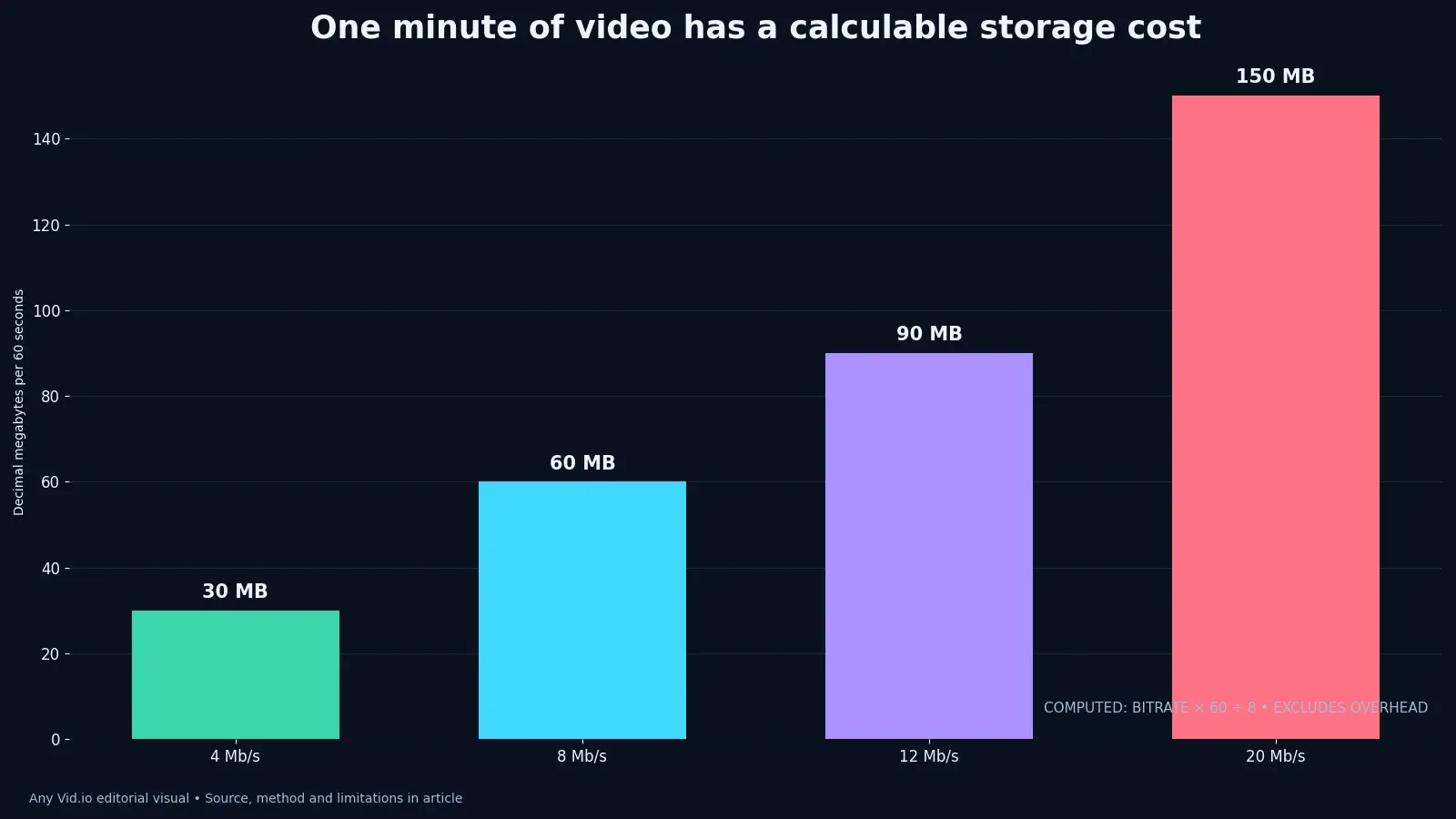
The case-study method inventories a creator’s production layers, calculates storage with transparent bitrate arithmetic and tests retrieval instead of celebrating a full drive. The chart is real computed data: at a constant eight megabits per second, sixty seconds of video carries about sixty decimal megabytes before container overhead. That number is not a TikTok delivery specification. It is planning math for masters and derivatives kept in the creator’s own archive.
Choose between a native save, data export and master
Use a native save when an available control provides the creator with a convenient viewing copy; use the account-data request when account records and broader information are the goal. If saving from a post, record whether the copy retains the expected audio and whether it is authorized for the next intended use; a platform copy is not a rights record.
Use the approved edit export or camera recording as the source for re-editing, licensing and cross-platform work whenever it exists. A saved post is a delivery copy; any platform compression, flattened captions or mixed audio may limit what can be changed later. Put the role of each file in its name and manifest instead of treating the newest download as the authoritative master.
If the post will become part of a series, connect it to the TikTok search-insights planning workflow so archive names follow the topic plan.
Create a TikTok inventory with separate fields for camera originals, project file, approved master, published URL, caption or transcript, music and other rights records, and any platform copy. Mark whether each item is present, where it is stored and when it was last opened. This reveals an incomplete archive before a phone replacement or account problem makes recovery urgent.
Request and record account data carefully
Follow TikTok’s live data-request instructions and record the selected format, request date and readiness window rather than relying on a third-party walkthrough.
Open the delivered package in a duplicate location, inventory its folders and compare what it contains with the production assets you expected; an account package is not automatically a media backup.
Protect the package because it can contain personal and account information beyond the videos. Store it with appropriate access controls rather than in a public project folder.
Pause here for a handoff check. Ask another person to follow the record without coaching; if confusing a shareable platform copy with an editable source master can still happen silently, the workflow needs a clearer owner, filename or acceptance test.
Understand what download permissions mean
Review TikTok’s current video-download settings to understand how the creator controls downloading of their posts and how account conditions can affect availability.
A disabled download control is not an invitation to route around the choice. Ask the rights holder for the source or a licensed delivery when collaboration requires the file. Avoid designing around a single metric.
For your own work, decide the download setting as part of the publishing brief and record why it supports or conflicts with the intended reuse and audience relationship.
Put the result in a TikTok media inventory and recovery log, attach the evidence path and date it so a later platform or software change can be compared with the same decision.
Build the archive layer by layer
Store capture originals, editing project, approved master, caption or transcript, cover, publishing record and any retained platform copy in clearly separated folders.
Use the long-video repurposing study to connect a short derivative to the original recording and edit project. Record the source time range, edit version and aspect-ratio decisions when a post comes from a longer shoot. That relationship lets a future editor retrieve clean footage rather than trying to crop or upscale a compressed vertical delivery copy.
Put project ID, clip role, language, rights status, source path, master checksum, post URL and retention decision in a simple manifest row. Keep the approved master and the published platform copy as different entries. A collaborator should be able to determine which file is safe for a new edit and which file merely documents what viewers saw.
Metrics such as coverage, storage cost and verified retrieval are useful only when they lead to a visible choice and do not conceal the limits of this sample.
Plan storage with bitrate math
Estimate storage from duration and bitrate, then measure real camera files for comparison. For constant-rate video, decimal gigabytes are approximately megabits per second multiplied by seconds, divided by 8,000. Add audio, graphics, project files and independent copies. A phone recording can occupy far more space than the post delivered by TikTok, so sizing an archive from downloads alone understates the capacity needed for production masters.
The chart uses constant-rate arithmetic only; real encoders often vary bitrate with content, and camera formats may carry much more data than a delivery copy.
Consult the container and codec guide before deciding that every MP4 should share one retention tier.
Make file-role labeling part of the publishing checklist. Before deleting a local edit folder, confirm that the camera originals, approved master, captions and rights record can be restored from another location. A platform post playing successfully does not demonstrate that the edit project or its separate layers survived.
Preserve captions, search context and corrections
Use the TikTok caption quality-control workflow before publication, then archive the corrected transcript beside the master. A flattened caption in a saved video cannot easily be revised for another language or an accessibility correction. Keep the caption source in a readable format so the team can fix text without rebuilding the entire edit.
Archive the working title, on-screen terms, search question, publication caption and correction history so a future reuse does not repeat an outdated or misspelled claim.
Retain the question or theme behind useful audience comments in an editorial note, without building unnecessary profiles of individual viewers. Record the post URL, date and context so a later creator understands the source of the idea. Keep that research separate from the production archive and delete it when it no longer serves a legitimate purpose.
Do not assume every account-data package contains the source video at its original quality. Check the current TikTok instructions, open the delivered package and record what is actually present. If a source or license is missing, mark the gap rather than treating an export request as a complete backup.
Recover a post when the project is missing
Label the recovered video as a platform copy, inspect duration and sync from beginning to end, and avoid a second transcode until the edit requirement is known.
If the recovered file's sound drifts, compare its beginning and end against the approved master. Follow the variable-frame-rate sync workflow on a duplicate before attributing the problem to TikTok. Record the inspected streams and the first timecode where sync diverges; a player issue, earlier export or later transcode can produce different symptoms.
Rebuild only missing layers needed for the next authorized use, such as a corrected caption file, a clean voice track or a cover. Note that alternate takes, separated audio and licensing records may not be recoverable from a flattened post. Keep the platform copy intact as evidence of the published version while working from duplicates.
Record the recovery attempt in the project manifest: source used, retrieved filename, checks performed and remaining gaps. This prevents a newer, smaller platform copy from silently replacing a verified production master. Include the date because platform controls and account-export contents can change.
Test restoration, not just downloading
Choose one archived post each month, retrieve its master and transcript from the secondary copy and open both outside the application that created them.
Check that a collaborator can locate the source and permission record from the manifest without asking which folder “final” means.
Feed repeated audience questions into the comment research loop only after the underlying media and context are recoverable.
A durable archive should let another editor find the best surviving source, verify that it opens and identify what the creator may lawfully reuse. Test those three outcomes on one completed project. If the source master or rights record cannot be found, record the limitation rather than calling the archive complete.
Audit one TikTok project from capture to restore
Select a TikTok you made that includes at least one caption layer, a sound decision and multiple source clips. Starting from a clean device or a temporary user account on the workstation, retrieve everything needed to reopen the project without relying on recent-file history. The test should identify which elements exist only inside an app, which are represented in an account-data package and which live in your own storage. Write down unavailable pieces rather than silently substituting the published download. A visible post is evidence of publication; it is not automatically a complete production archive.
Inspect the published copy as a delivery artifact. Confirm that it opens, seeks, plays audio and maintains the expected orientation. Compare the first and last spoken words with the caption record, and note any timing differences that matter for accessibility or reuse. If a native save control is unavailable, distinguish “control not present in this account today” from “TikTok never provides this control.” Settings can vary by age, region, privacy state, device and rollout. That careful language is both more accurate for readers and more durable when the interface changes.
Restore the project into a new working folder using duplicates, then export a clearly named test file. Do not overwrite the recovered items. The objective is to prove that the archive supports a future edit, not simply that a video can be watched. Capture the restore date, missing dependencies, fonts, sounds and permission notes. If the test requires a prohibited bypass or media you do not have the right to use, stop and replace the asset. A useful creator archive reduces that last-minute rights ambiguity before a sponsorship or repurposing deadline.
Case-study table
| Route or asset | What it can provide | Best use | Main limitation |
|---|---|---|---|
| Camera original | Highest-control recorded source | Re-editing, licensing and preservation | May lack platform-added music or text |
| Approved vertical master | Finished creator-controlled export | Publishing and cross-platform adaptation | Does not contain editable layers |
| Native TikTok save | Convenient platform copy when available | Viewing, reference or recovery | May be processed and may include platform presentation |
| Download your data package | Selected account information | Records, portability and audit | Not a replacement for project media |
| Third-party retrieval | A representation exposed to the service | Only with rights and careful security review | Privacy, quality, reliability and permission risks |
Use the table to distinguish source, approved master, platform copy and account-data record. Fill it with files from one project, their verified locations and the next restore date. The rows are a recovery checklist, not a claim that a platform download restores every production layer.
Put the method to work
Choose one TikTok project and compare the camera source, approved master, retained platform copy and account-data record. Label their roles before moving them. The exercise will reveal whether the archive has redundancy or merely several derivatives of the same missing source.
More TikTok production and creator-archive workflows are available on the AnyVid.io blog. Save and reuse only media you created, own, or have permission or another lawful right to save.
AnyVid.io Editorial Team
The AnyVid.io Editorial Team publishes practical guides on short-form video production, AI-assisted creator workflows, Instagram and TikTok strategy, video SEO, audience growth and creator monetization.
Frequently asked questions
How can I download my own TikTok videos?
Use the current save controls available for your own post, retain the approved export from your editing workflow, or request your TikTok data through the official account settings when broader account information is needed. Controls and availability can vary, so verify the live app.
Does TikTok’s Download your data file contain every original video?
Do not assume that it reconstructs a production archive. The package is an account-information export whose contents and formats should be inspected after delivery. Keep camera originals, edit projects and approved masters independently. For a TikTok creator building a durable copy of their own work, the safest next step is a reversible test with one authorized file and a written result rather than a universal assumption.
Can I download a TikTok when the creator disabled downloads?
A disabled control communicates a choice and may also reflect platform or account restrictions. Do not bypass it. Ask the creator or rights holder for a source file and permission when a collaboration, license or other lawful use requires the media.
How much storage does a minute of TikTok-ready video use?
It depends on bitrate, codec, audio and overhead. At a constant 8 megabits per second, the video payload is about 60 decimal megabytes per minute before overhead. Real variable-bitrate files can differ substantially. If confusing a shareable platform copy with an editable source master remains possible, preserve the original state and ask for rights or technical review before changing the only surviving copy.
Should I keep a downloaded post if I still have the master?
It can be useful as evidence of platform presentation or for troubleshooting, but label it as a platform copy. The approved master should remain authoritative for new exports and licensing when it is complete and verified. Record the route, date and result in a TikTok media inventory and recovery log so the same question can be checked against future platform or workflow changes.
What belongs in a TikTok creator archive?
Keep source media, project files, approved master, captions or transcript, cover assets, publishing URL and date, rights notes, account-data records when useful, checksums and a manifest that explains which copy is authoritative. For a TikTok creator building a durable copy of their own work, the safest next step is a reversible test with one authorized file and a written result rather than a universal assumption.
Was this article helpful?
Tell us what worked so we can improve future content.